點選貼文 IP 可以進入 IP 位址報告頁 (modcp.php?mode=ip)
只能看到: IP [ #貼文]
有沒有可能將這裡的 IP 改為連結-
點選該 IP 可以跑出另一個畫面\r
列出所有用那個 IP 發言的紀錄
顯示格式就像我們在 [檢視 XXX 的個人資料] 時
點選連結: [查詢 XXX 發表的所有文章] 結果一樣\r
我原先想利用 search.php 加一個 search_IP 模態去找\r
搞了好久,還是被 search.php 打敗了,哀...
help...

版主: 版主管理群
奇怪!我到各個網站爬這麼久怎麼沒注意到這支外掛?依夢兒 寫:Advanced IP Tools Pack
http://www.phpbb.com/phpBB/viewtopic.php?t=234613
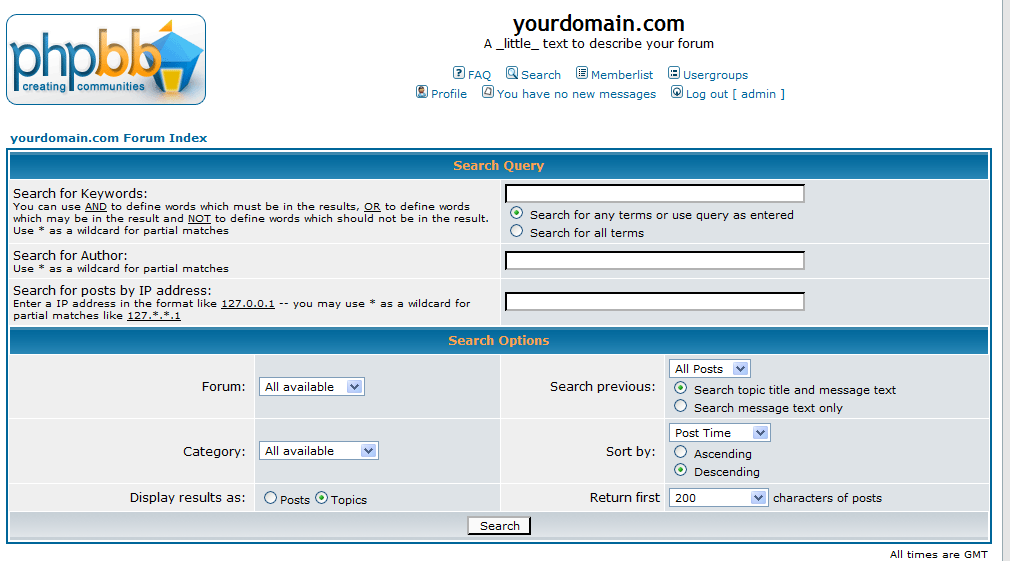
可以達成你要的效果,不過變成要進入搜尋畫面自己搜尋:
代碼: 選擇全部
#
#-----[ OPEN ]------------------------------------------
#
search.php


#
#-----[ FIND ]------------------------------------------
#
\n$sort_by_types = array($lang['Sort_Time'], $lang['Sort_Post_Subject'], $lang['Sort_Topic_Title'], $lang['Sort_Author'], $lang['Sort_Forum']);


#
#-----[ AFTER, ADD ]------------------------------------------
#

// Start Advanced IP Tools Pack MOD
$search_ip = '';

// For security reasons, we need to make sure the IP lookup is coming from an admin or mod.
if ( ($userdata['user_level'] == ADMIN) || ($userdata['user_level'] == MOD) )
{
	if ( !empty($HTTP_POST_VARS['search_ip']) || !empty($HTTP_GET_VARS['search_ip']) )
	{
		$ip_address = ( !empty($HTTP_POST_VARS['search_ip']) ) ? $HTTP_POST_VARS['search_ip'] : $HTTP_GET_VARS['search_ip'];
		$ip_address = htmlspecialchars($ip_address);
		$ip_address = str_replace("\'", "''", $ip_address);
		$ip_pieces = explode('.', $ip_address);
		$ip_pieces_count = count($ip_pieces) - 1;

			for ($i = 0; $i <= $ip_pieces_count; $i++)
			{
				$search_ip .= ( $ip_pieces[$i] == '*' ) ? '%' : sprintf('%02x', $ip_pieces[$i]);
			}

	}

	else
	{
		$search_ip = '';
	}
}
// End Advanced IP Tools Pack MOD


#
#-----[ FIND ]------------------------------------------
#
# Note: full line to find is: else if ( $search_keywords != '' || $search_author != '' || $search_id )
#
$search_keywords != '' || $search_author != '' || $search_id


#
#-----[ IN-LINE FIND ]------------------------------------------
#
$search_id


#
#-----[ IN-LINE AFTER, ADD ]------------------------------------------
#
# Important note: there should be a space before the || AND after the != ''
#
 || $search_ip != ''


#
#-----[ FIND ]------------------------------------------
#
#Note: full line to find is: if ( $search_id == 'newposts' || $search_id == 'egosearch' || $search_id == 'unanswered' || $search_keywords != '' || $search_author != '' )
#
$search_id == 'unanswered' || $search_keywords != '' || $search_author != ''


#
#-----[ IN-LINE FIND ]------------------------------------------
#
$search_author != ''


#
#-----[ IN-LINE AFTER, ADD ]------------------------------------------
#
# Important note: there should be a space before the || AND after the != ''
#
 || $search_ip != ''


#
#-----[ FIND ]------------------------------------------
#
# Note: full line to find is: if ( $search_id == 'newposts' || $search_id == 'egosearch' || ( $search_author != '' && $search_keywords == '' )  )
#
( $search_author != '' && $search_keywords == '' )


#
#-----[ IN-LINE FIND ]------------------------------------------
#
$search_keywords == '' )


#
#-----[ IN-LINE AFTER, ADD ]------------------------------------------
#
# Important note: there should be a space before the || AND after the != ''
#
 || $search_ip != ''


#
#-----[ FIND ]------------------------------------------
#
			if ( $search_id == 'newposts' )
			{
				if ( $userdata['session_logged_in'] )
				{
					$sql = "SELECT post_id
						FROM " . POSTS_TABLE . "
						WHERE post_time >= " . $userdata['user_lastvisit'];
				}
				else
				{
					redirect(append_sid("login.$phpEx?redirect=search.$phpEx&search_id=newposts", true));
				}

				$show_results = 'topics';
				$sort_by = 0;
				$sort_dir = 'DESC';
			}


#
#-----[ AFTER, ADD ]------------------------------------------
#

			// Start Advanced IP Tools Pack MOD
			else if ($search_ip != '')
			{
				$sql = "SELECT post_id FROM " . POSTS_TABLE . " WHERE poster_ip LIKE '$search_ip'";
				$show_results = 'posts';
				$sort_by = 0;
				$sort_dir = 'DESC';
			}
//End Advanced IP Tools Pack MOD代碼: 選擇全部
#
#-----[ OPEN ]------------------------------------------
#
modcp.php

#
#-----[ FIND ]------------------------------------------
#
'IP' => $ip_this_post,

#
#-----[ AFTER, ADD ]------------------------------------------
#
// BEGIN Search IP Posts
'U_SEARCH_IP_POSTS' => "search.$phpEx?search_ip=". $ip_this_post,
// END Search IP Posts

#
#-----[ FIND ]------------------------------------------
#
'IP' => $ip,
'POSTS' => $row['postings'] . ' ' . ( ( $row['postings'] == 1 ) ? $lang['Post'] : $lang['Posts'] ),

#
#-----[ AFTER, ADD ]------------------------------------------
#
// BEGIN Search IP Posts
'U_SEARCH_IP_POSTS' => "search.$phpEx?search_ip=". $ip,
// END Search IP Posts

#
#-----[ OPEN ]------------------------------------------
#
modcp_viewip.tpl

#
#-----[ FIND ]------------------------------------------
#
{IP}

#
#-----[ REPLACE WITH ]------------------------------------------
#
<a href="{U_SEARCH_IP_POSTS}">{IP}</a>

#
#-----[ FIND ]------------------------------------------
#
{iprow.IP}

#
#-----[ REPLACE WITH ]------------------------------------------
#
<a href="{iprow.U_SEARCH_IP_POSTS}">{iprow.IP}</a>
進入資料庫,將紀錄那一些 IP 的 TABLE 給清空(不是刪除,是清空)吧?athlon 寫:請問前輩知道如何去刪除Advanced IP Tools Pack的紀錄呢?
兩三天而已,個人檔案那而的紀錄已經有四頁了
謝謝~
momoC 兄少加了以下的修改, 這樣在搜尋內才會有搜尋 ip 的選項!!momoC 寫:可以了,非常感謝依夢兒的指引,好快就解決了!
我借用該外掛的這段程式:
代碼: 選擇全部
#
#-----[ OPEN ]------------------------------------------
#
templates/subSilver/search_body.tpl


#
#-----[ FIND ]------------------------------------------
#
<tr>
	<td class="row1" colspan="2"><span class="gen">{L_SEARCH_AUTHOR}:</span><br /><span class="gensmall">{L_SEARCH_AUTHOR_EXPLAIN}</span></td>
	<td class="row2" colspan="2" valign="middle"><span class="genmed"><input type="text" style="width: 300px" class="post" name="search_author" size="30" /></span></td>
</tr>


#
#-----[ AFTER, ADD ]------------------------------------------
#
<tr>
	<td class="row1" colspan="2"><span class="gen">{L_SEARCH_IP}:</span><br /><span class="gensmall">{L_SEARCH_IP_EXPLAIN}</span></td>
	<td class="row2" colspan="2" valign="middle"><span class="genmed"><input type="text" style="width: 300px" class="post" name="search_ip" size="30" /></span></td>
</tr>


#
#-----[ OPEN ]------------------------------------------
#
language/lang_english/lang_main.php


#
#-----[ FIND ]------------------------------------------
#
# Note: the complete line to find is: $lang['Viewing_user_profile'] = 'Viewing profile :: %s'; // %s is username
#
$lang['Viewing_user_profile']

#
#-----[ BEFORE, ADD ]------------------------------------------
#
$lang['Search_ip'] = 'Search for posts by IP address';
$lang['Search_ip_explain'] = 'Enter a IP address in the format like <u>127.0.0.1</u> -- you may use * as a wildcard for partial matches like <u>127.*.*.1</u>';
代碼: 選擇全部
$lang['Search_ip'] = '以發表文章的 IP 位?#125;搜尋';
$lang['Search_ip_explain'] = '請輸入要搜尋的條件, 如 <u>127.0.0.1</u> -- 您?#93;可以用 * 來取代某一網段的數值, 如 <u>127.*.*.1</u>';